Build multi-cloud & hybrid networks


Goals
The purpose of this guide is to create four distributed networks and combine them into one highly available logically connected network.
- Build with the top three cloud vendors (aws.amazon.com, azure.microsoft.com, cloud.google.com) and one On-Premise (pfsense.org) network
- Scale Mesh network topology to allow additional point-to-point connections
- Dynamic routing between Autonomous Systems (AS) using Border Gateway Protocol (BGP)
- Encrypt network traversal over Virtual Private Network (VPN) tunnels using Internet Protocol Security (IPSec)
| AWS | Azure | CGP | PFSense |
|---|---|---|---|
| Network | VNET | VPC | VLAN |
| Gateway | VWAN | NCC | ISP |
| DNS | Private Resolver | Cloud DNS | Pihole |
| S2S | Connection | Peer VPN | IPSec |
| SSM | Azure vm | GCP vm | Mac |
Network
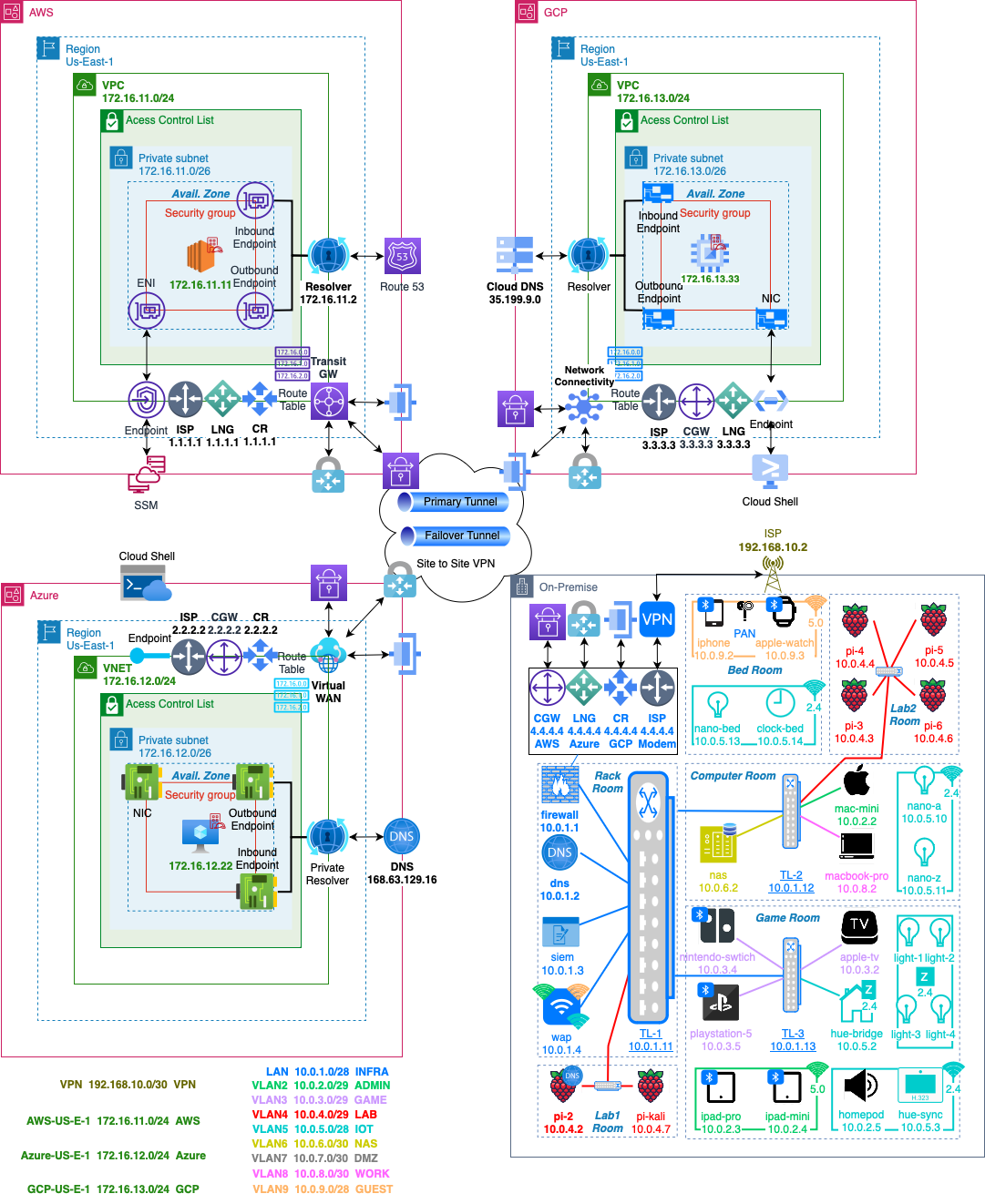
- Final mesh network topology architecture
AWS
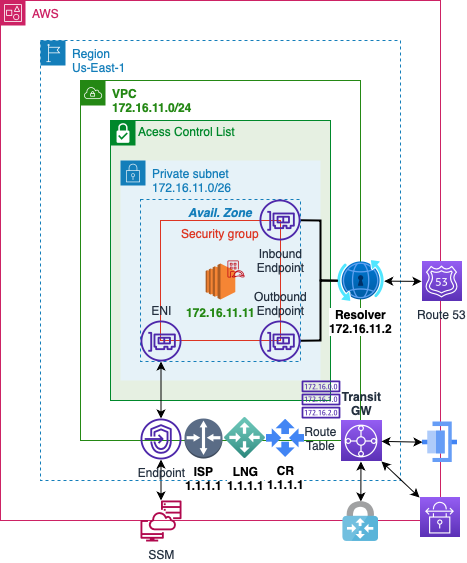
Network
- Create a Virtual Private Cloud Network in AWS
| Resource to Create | VPC and more |
| Name | vpc-aws |
| IPv4 CIDR block | 172.16.11.0/24 |
| Num of AZs | 2 |
| Public | 0 |
| Private | 2 |
| NAT | None |
| Endpoint | None |
Gateway
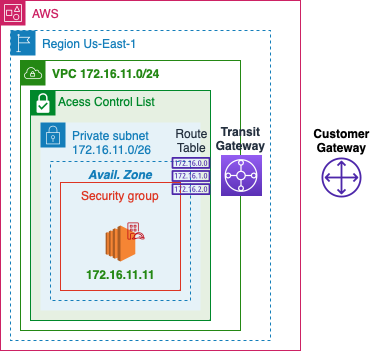
- Identify the IP address of the ISP
- Point to Point Identification and traffic passthrough
Customer Gateway
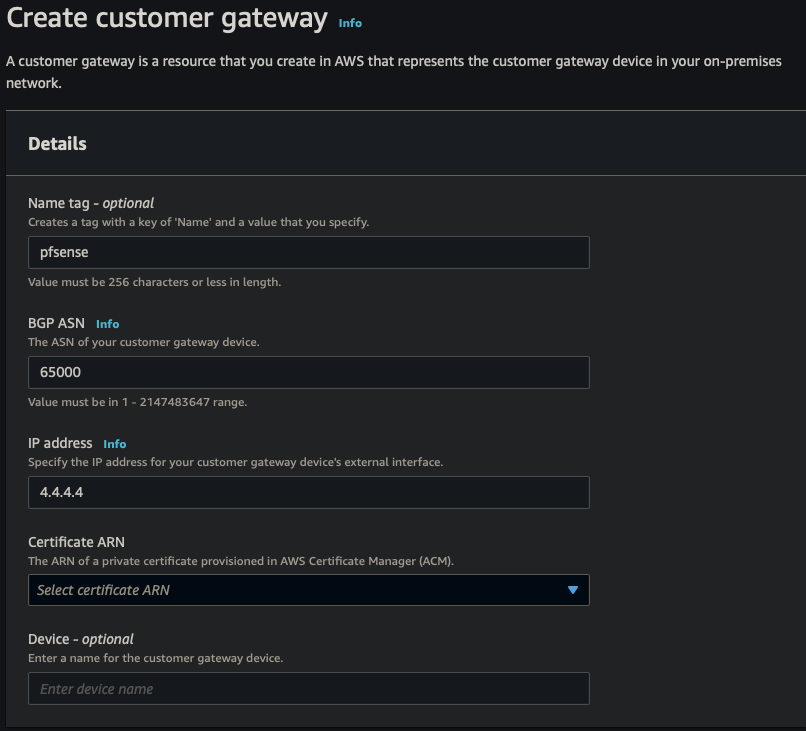
| Name | pfsense |
| BGP ASN | 65000 |
| IP address | 4.4.4.4 |
Transit Gateway
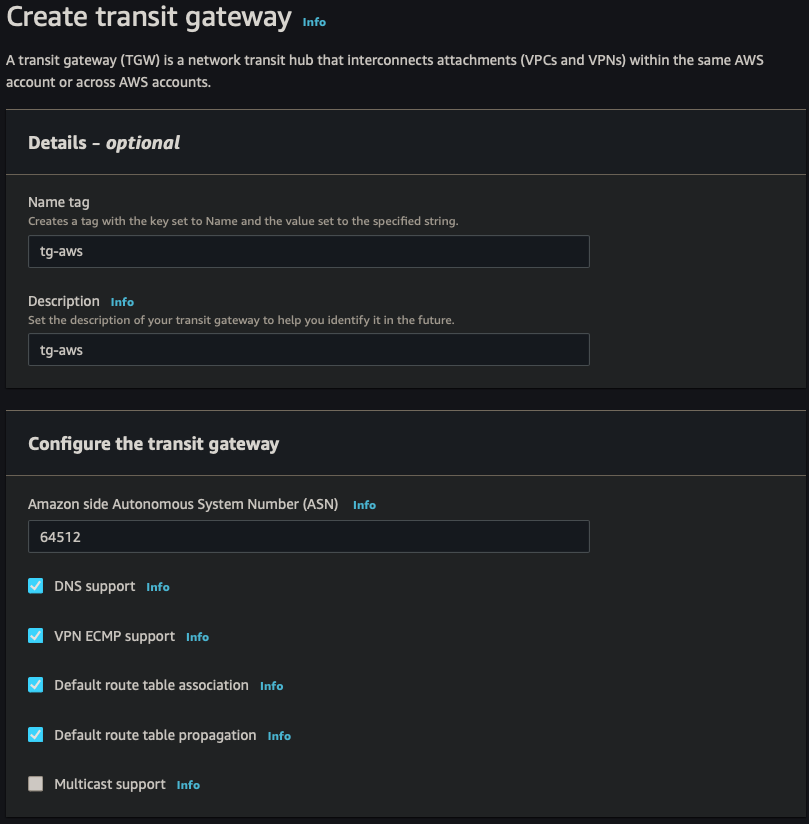
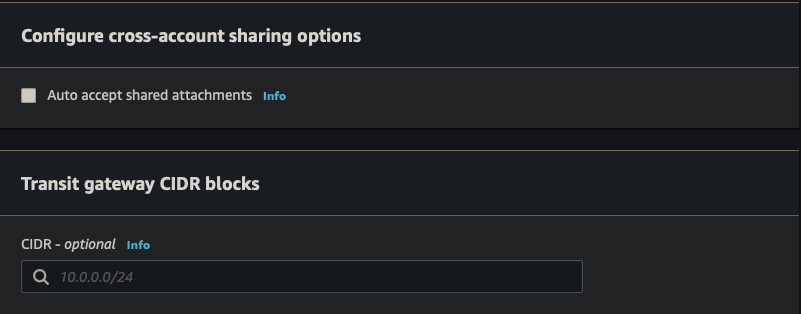
| Name | tg-aws |
| Description | tg-aws |
| ASN | 64512 |
Route Table
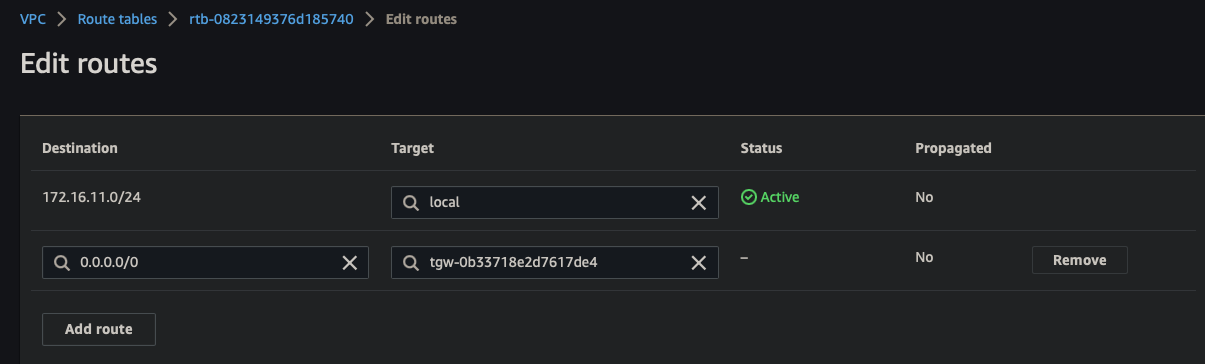
- Update routes to TGW
DNS
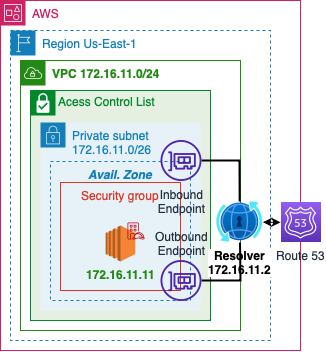
- AWS will dedicate a reserved IP address x.x.x.2 for a VPC resolver
- Outbound Endpoints will allow you to forward DNS requests for resolvers on other networks
- Inbound Endpoints will allow resolvers on other networks to forward requests to AWS
Outbound Endpoint
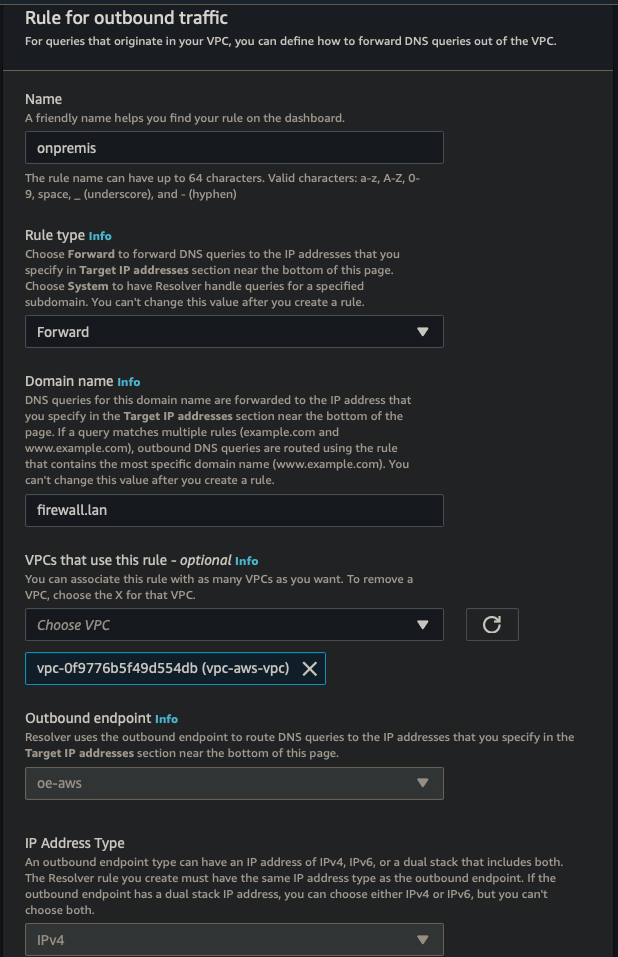
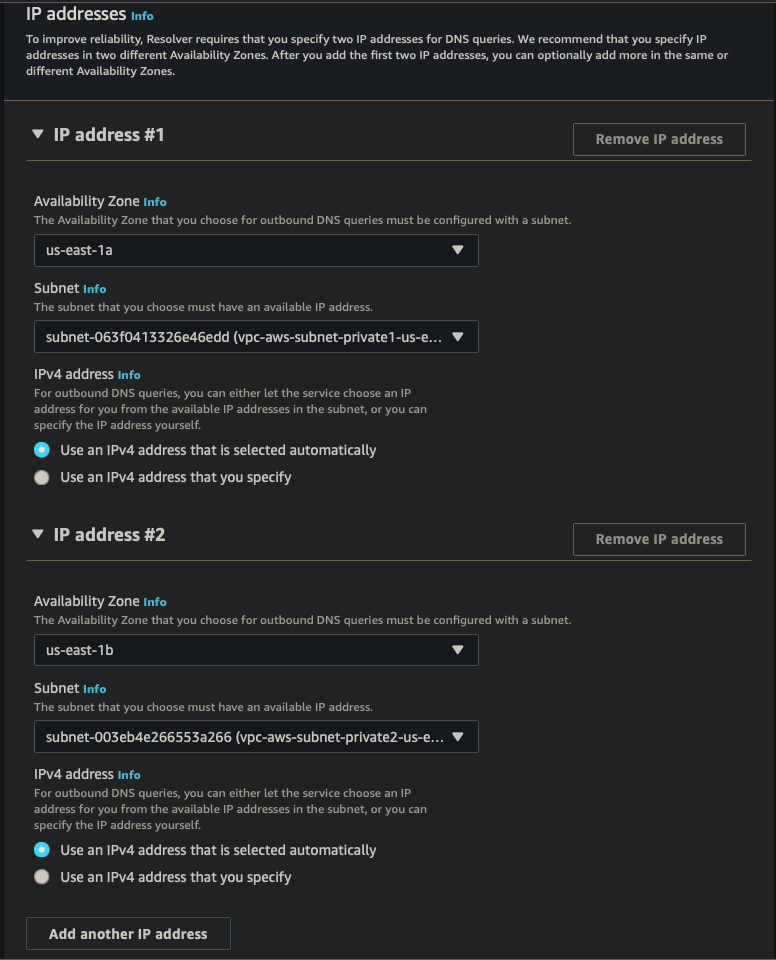
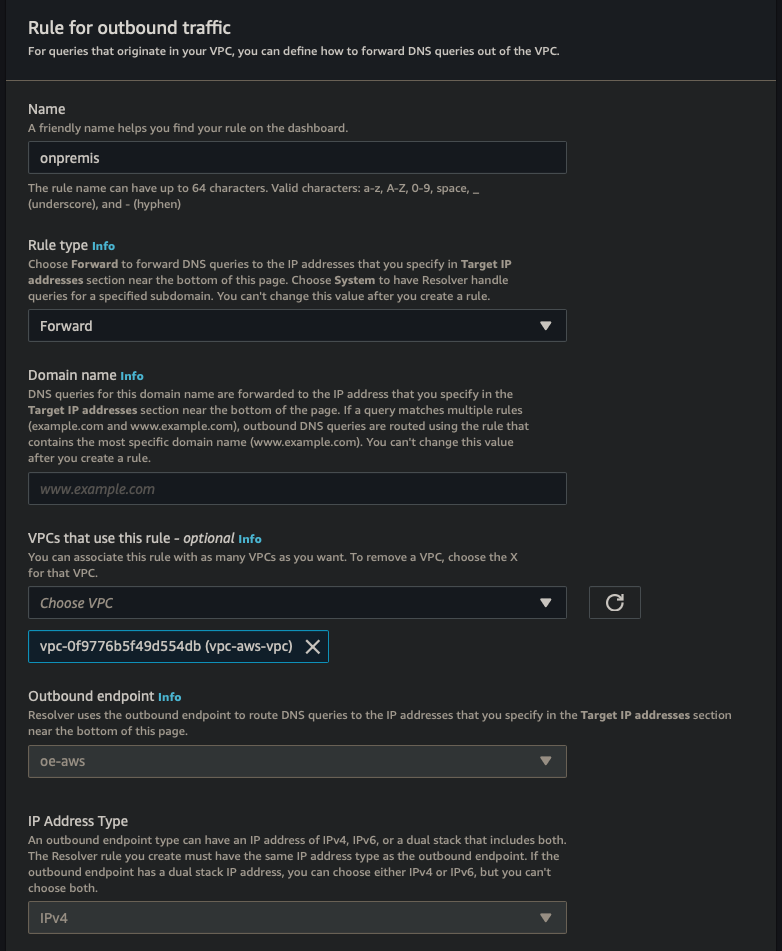
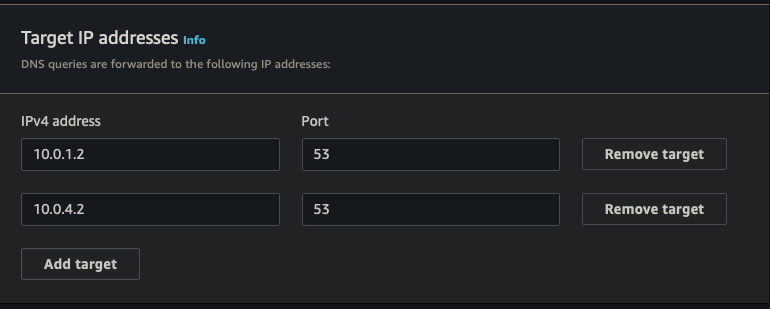
| Endpoint Name | oe-aws |
| VPC | vpc-aws-vpc |
| Security Group | Default |
| Endpoint Type | IPv4 |
| IP Address #1 | AZ us-east-1, subnet 1, IPv4 |
| IP Address #2 | AZ us-east-2, subnet 2, IPv4 |
| Rule Name | onpremise |
| Rule Rule Type | Forward |
| Domain Name | firewall.lan |
| VPC Rule | vpc-aws-vpc |
| Target IP #1 | 10.0.1.2:53 |
| Target IP #2 | 10.0.4.2:53 |
Inbound Endpoint
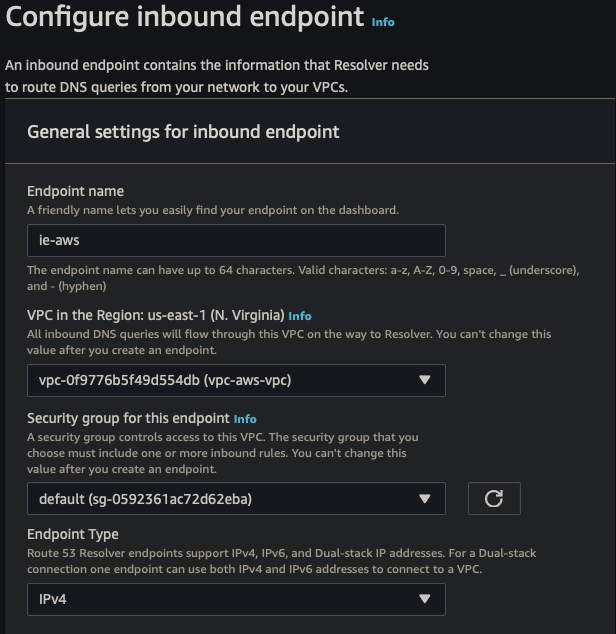
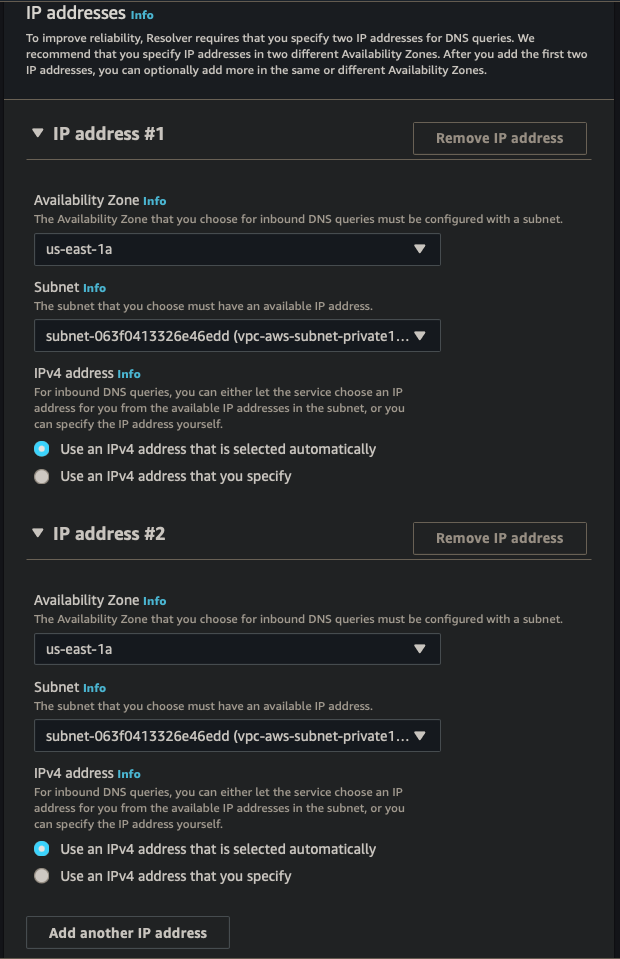
| Endpoint Name | ie-aws |
| VPC | vpc-aws-vpc |
| Security Group | Default |
| Endpoint Type | IPv4 |
| IP Address #1 | AZ us-east-1, subnet 1, IPv4 |
| IP Address #2 | AZ us-east-2, subnet 2, IPv4 |
Site to Site
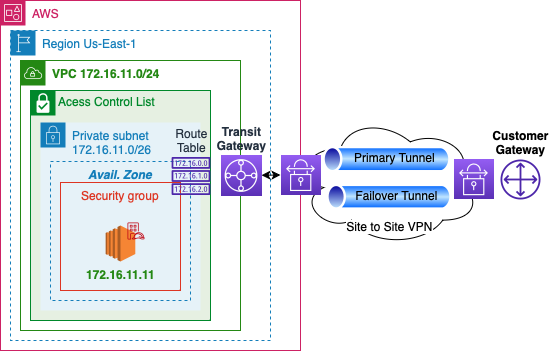
- Use IPsec tunnels to connect AWS to another datacenter
- Have a failover connection for High availability
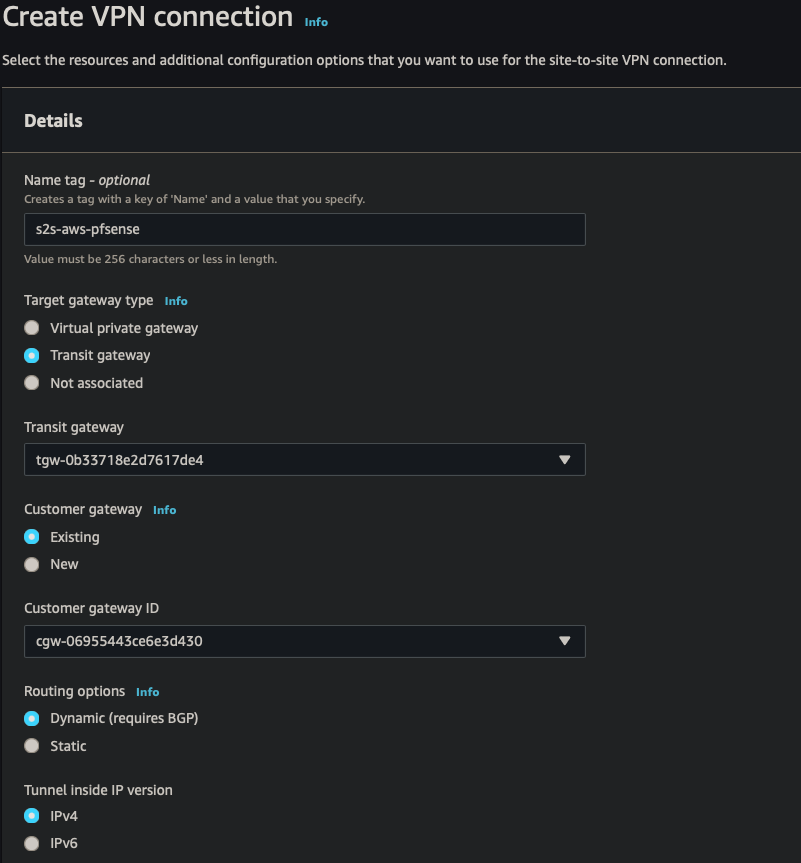
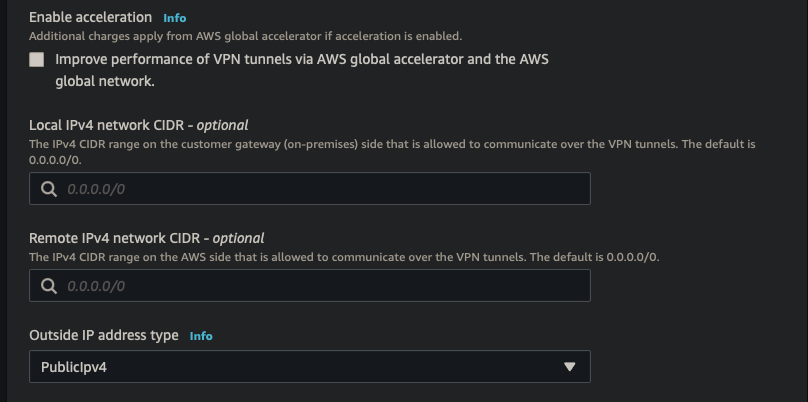
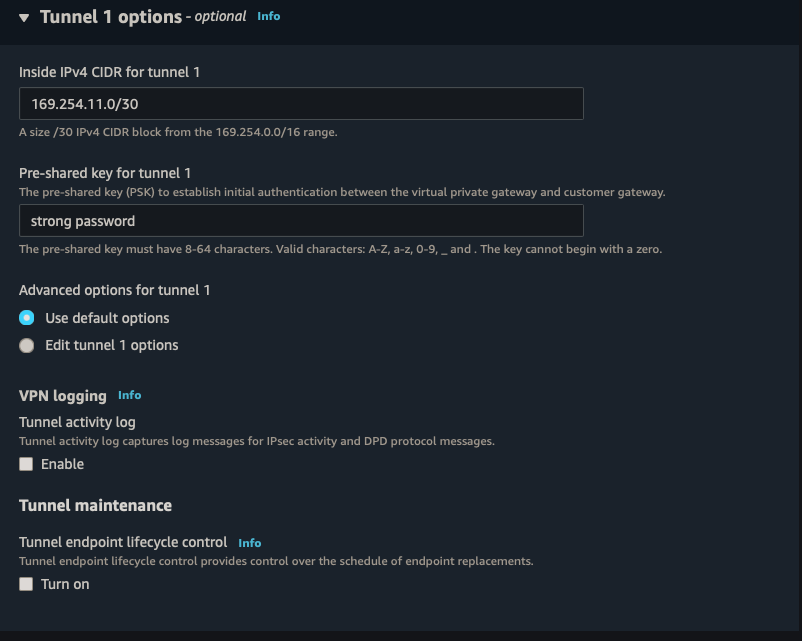
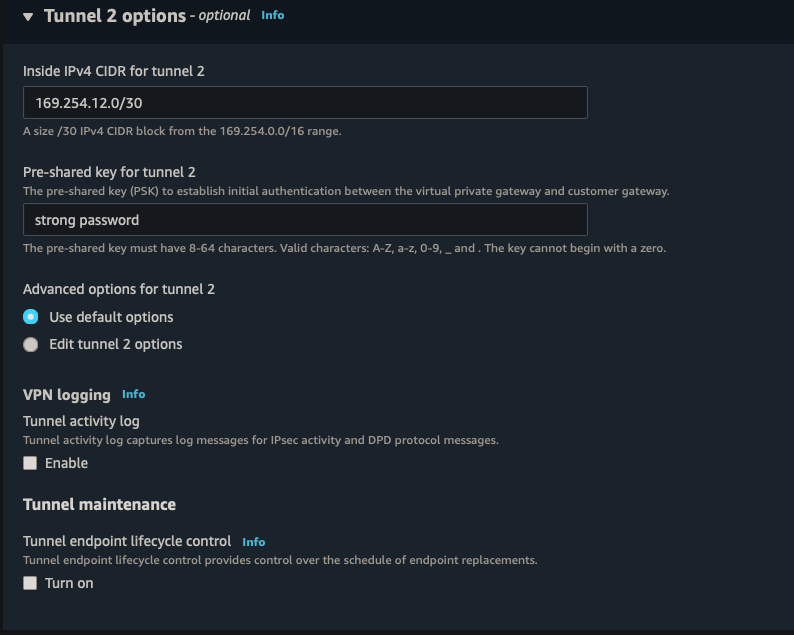
||| |:-:|:-:|:-:| |AWS|s2s-aws-pfsense| |Target gateway type|Transit Gateway| |Transit Gateway|TGW| |Customer Gateway|CGW| |Routing Options|Dynamic| |Tunnel inside IP|IPv4| |Inside IPv4 CIDR for tunnel 1|169.254.11.0/30| |Pre-shared key for tunnel 1|strong password| |Inside IPv4 CIDR for tunnel 2|169.254.12.0/30| |Pre-shared key for tunnel 2|strong password|
Status

- When BGP session is established, the status will go from down to up
SSM
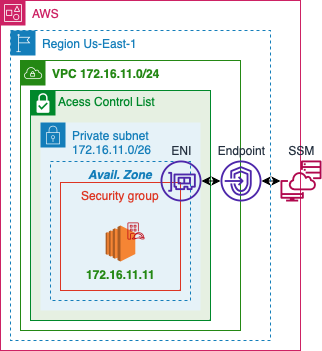
- Using AWS System Manager will allow remote access without opening any ssh ports
- Use to keep your network private
- Use to debug any connectivity issues
IAM Role Policy
{
    "Version": "2012-10-17",
    "Statement": [
        {
            "Action": [
                "ssm:DescribeAssociation",
                "ssm:GetDeployablePatchSnapshotForInstance",
                "ssm:GetDocument",
                "ssm:DescribeDocument",
                "ssm:GetManifest",
                "ssm:GetParameter",
                "ssm:GetParameters",
                "ssm:ListAssociations",
                "ssm:ListInstanceAssociations",
                "ssm:PutInventory",
                "ssm:PutComplianceItems",
                "ssm:PutConfigurePackageResult",
                "ssm:UpdateAssociationStatus",
                "ssm:UpdateInstanceAssociationStatus",
                "ssm:UpdateInstanceInformation"
            ],
            "Resource": "*",
            "Effect": "Allow"
        },
        {
            "Action": [
                "ssmmessages:CreateControlChannel",
                "ssmmessages:CreateDataChannel",
                "ssmmessages:OpenControlChannel",
                "ssmmessages:OpenDataChannel"
            ],
            "Resource": "*",
            "Effect": "Allow"
        },
        {
            "Action": [
                "ec2messages:AcknowledgeMessage",
                "ec2messages:DeleteMessage",
                "ec2messages:FailMessage",
                "ec2messages:GetEndpoint",
                "ec2messages:GetMessages",
                "ec2messages:SendReply"
            ],
            "Resource": "*",
            "Effect": "Allow"
        }
    ]
}
Endpoint
SSM Endpoint
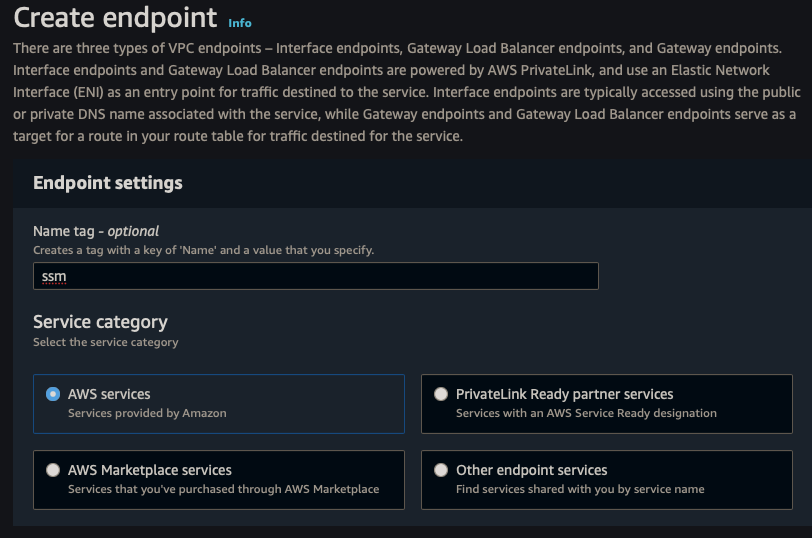
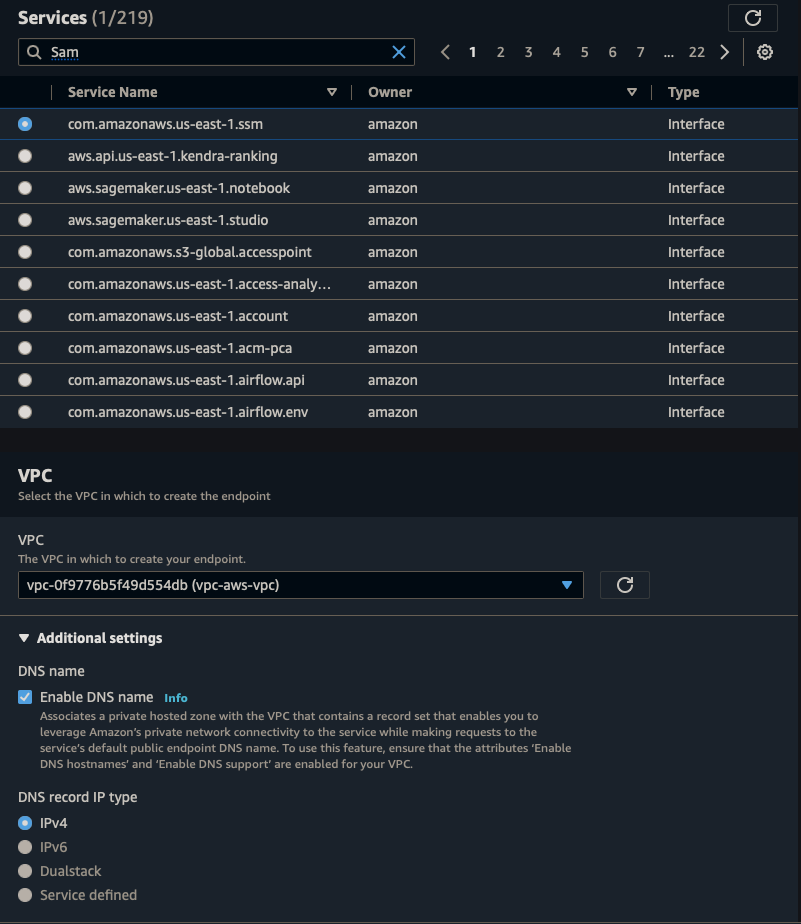
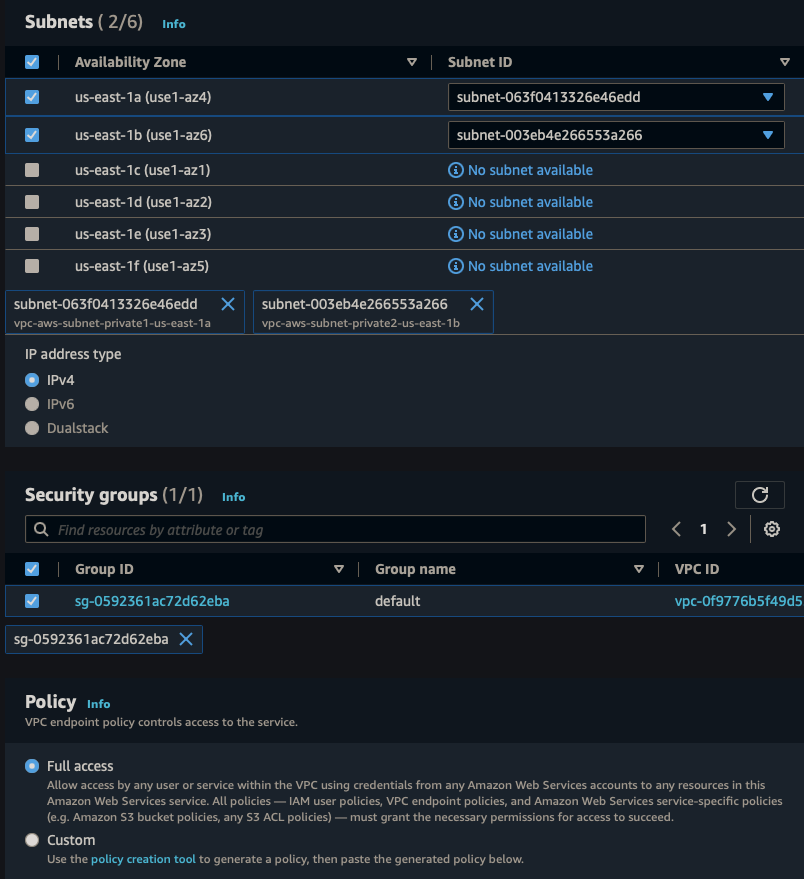
||| |:-:|:-:|:-:| |Name|ssm-endpoint| |Service Category|AWS Service| |Service|SSM| |VPC|vpc-aws-vpc| |Subnets|us-east-1, us-east-2| |Security Group|Default| |Policy|Full Access|
SSMMessage Endpoint
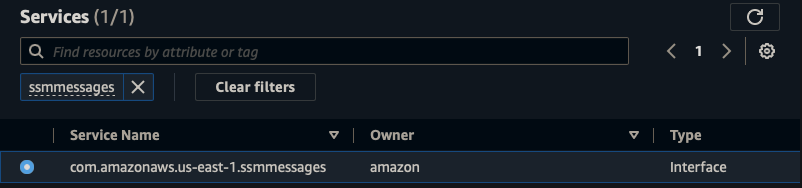
||| |:-:|:-:|:-:| |Name|ssmmessage-endpoint| |Service Category|AWS Service| |Service|SSMmessages| |VPC|vpc-aws-vpc| |Subnets|us-east-1, us-east-2| |Security Group|Default| |Policy|Full Access|
EC2Message Endpoint
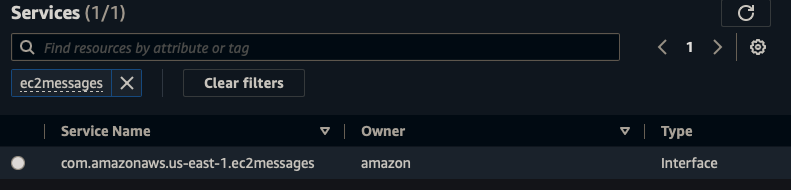
||| |:-:|:-:|:-:| |Name|ec2message-endpoint| |Service Category|AWS Service| |Service|ec2messages| |VPC|vpc-aws-vpc| |Subnets|us-east-1, us-east-2| |Security Group|Default| |Policy|Full Access|
Azure
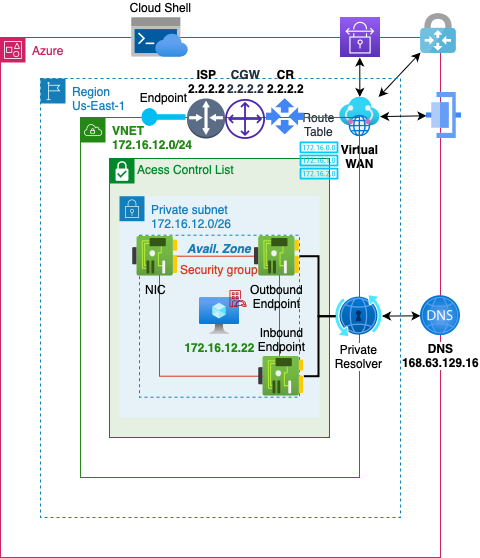
VNET
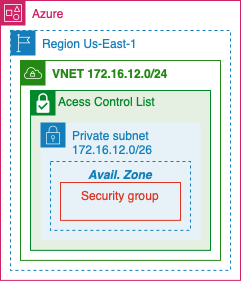
- Create a Virtual Network on Azure
Resource Group
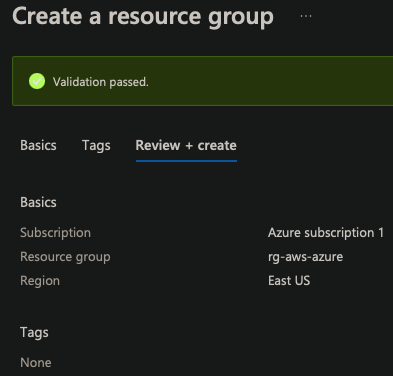
- Resource Group provides a single detailed view of all resources in a groups stack
| Resource group | rg-aws-azure |
| Region | East US |
Virtual Network
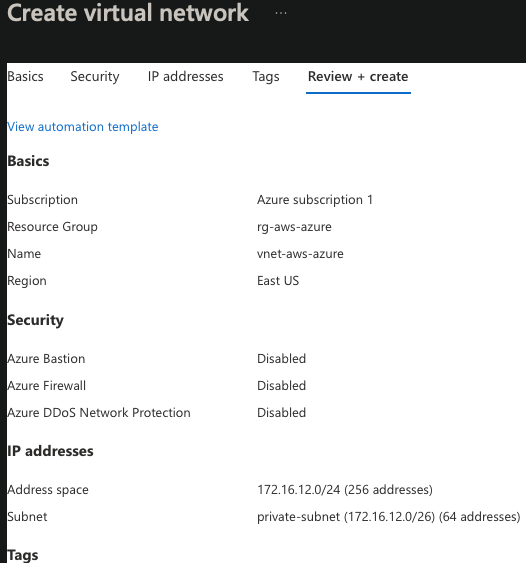
- This Iaas will build a virtual network similar to a VPC
- Create 1 network /24 CIDR to create 4 subnets with /26 CIDR
| Resource group | rg-aws-azure |
| Name | vnet-aws-azure |
| Region | East US |
| Bastion | Disabled |
| Firewall | Disabled |
| DDoS | Disabled |
| Adress Space | 172.16.12.0/24 |
| Subnet | 172.16.12.0/26 |
VWAN
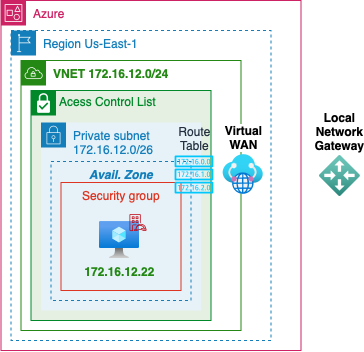
- TODO: Azure VWAN
- Have a AWS site-to-site connection config to populate data
Local Network Gateway
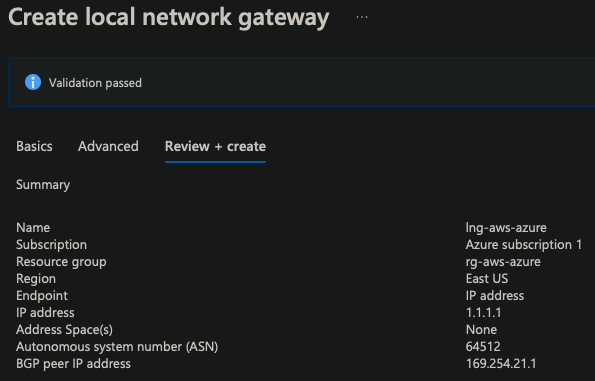
- IP of the customer/data center Gateway
| Resource group | rg-aws-azure |
| Region | East US |
| Endpoint | IP Address |
| IP Address | 1.1.1.1 |
| Address Space(s) | None |
| ASN | 64512 |
| BGP | 169.254.21.1 |
Reserved APIPA
||| |:-:|:-:|:-:| |AWS|169.254.0.0/16| |Azure|169.254.21.0/24 - 169.254.22.0/24|
Virtual Network Gateway
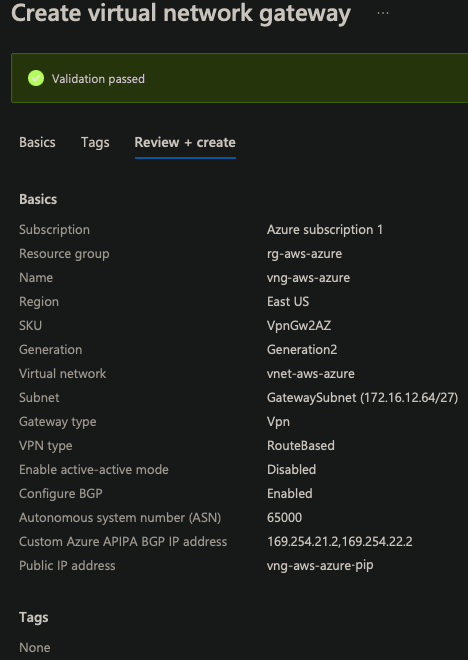
| Resource group | rg-aws-azure |
| Region | East US |
| SKU | VPNGw2AZ |
| Generation | 2 |
| VNET | vnet-aws-azure |
| Subnet | 172.16.12.64/27 |
| Gateway Type | VPN |
| VPN Type | Route Based |
| Active-active | Disabled |
| BGB | Enabled |
| ASN | 65000 |
| Custom APIPA | 169.254.21.2, 169.254.22.2 |
| Public IP adress | vng-aws-azure-pip |
Private Resolver
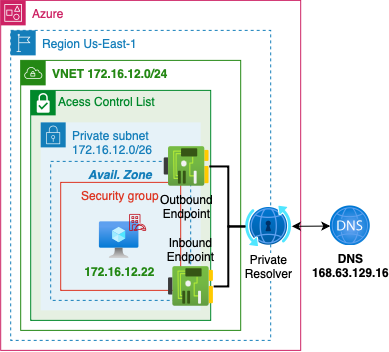
- TODO: Azure DNS
Connection
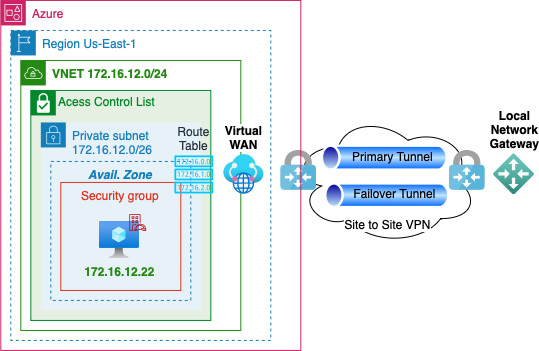
- Use to create an IPsec connection using BGP
- Create a second connection for failover
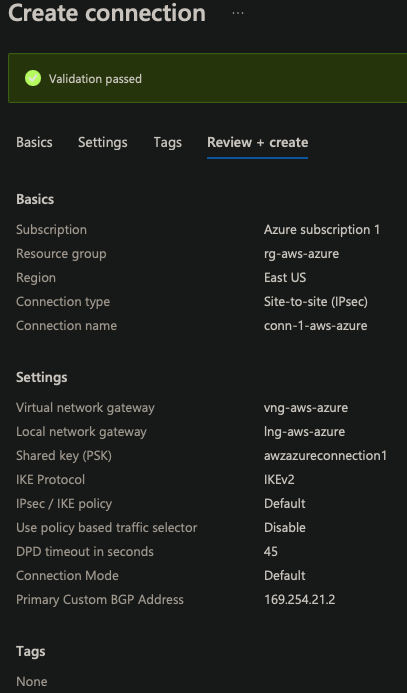
| Resource group | rg-aws-azure |
| Region | East US |
| Connection type | Site-to-site(IPsec) |
| Connection name | conn-1-aws-azure |
| Virtual Network Gateway | vng-aws-azure |
| Local Network Gateway | lng-aws-azure |
| IKE Protocol | IKEv2 |
| IpSec / IKE policy | Default |
| Use Policy based traffic selector | Disable |
| DPD timeout | 45 |
| Connection Mode | Default |
| BGP | 169.254.21.2 |
BGP
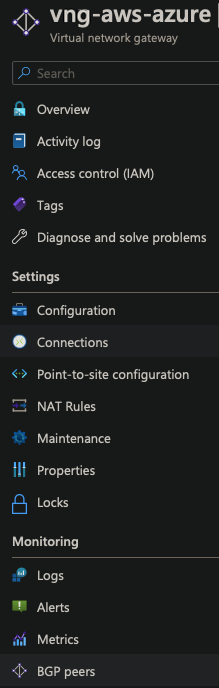

- Verify Connection is enabled
- Create second connection for failover
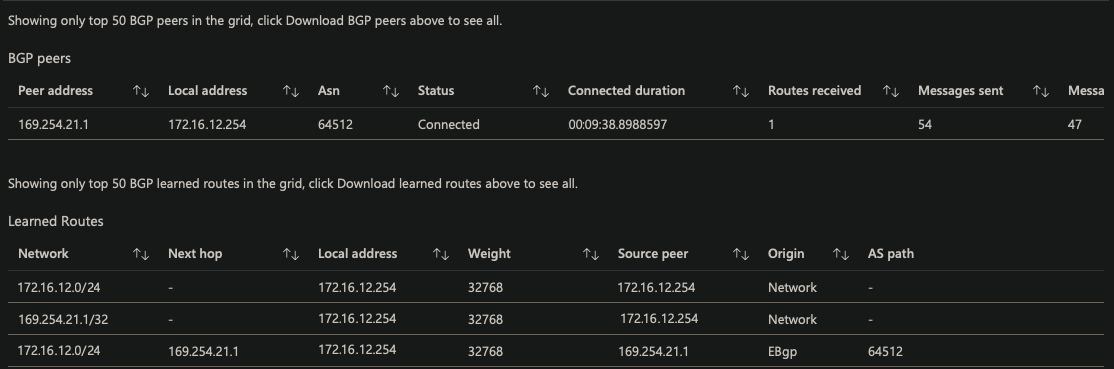
- Verify Route propagation from BGP
Azure VM
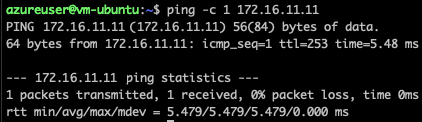
- Azure -> AWS
GCP
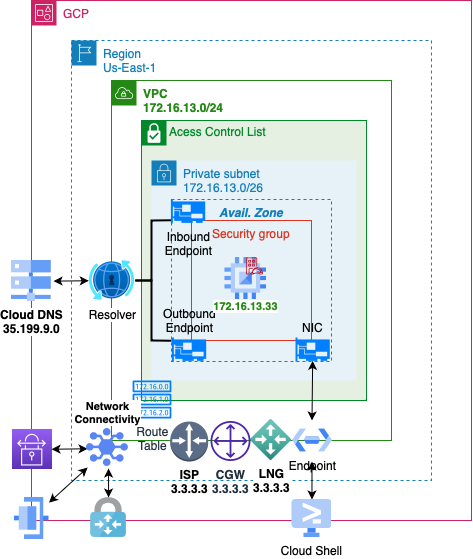
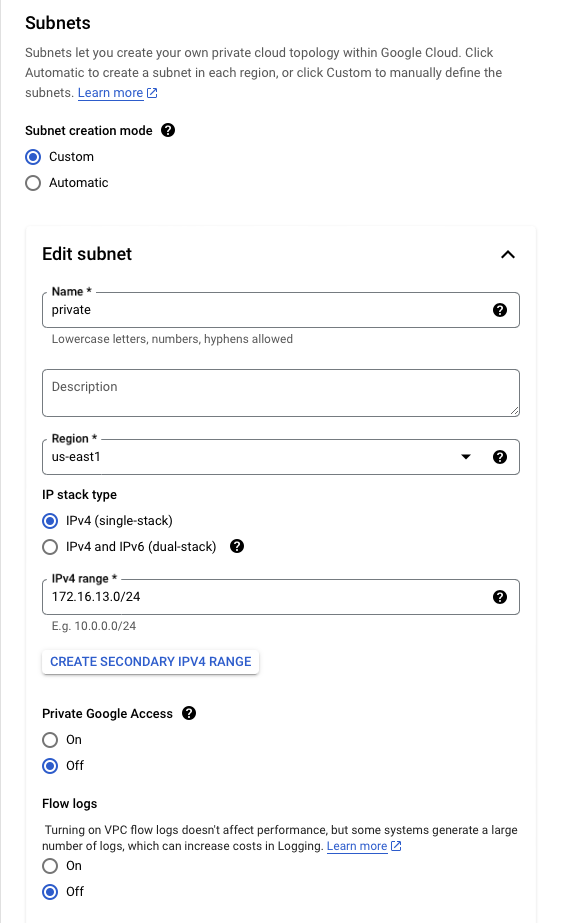
VPC
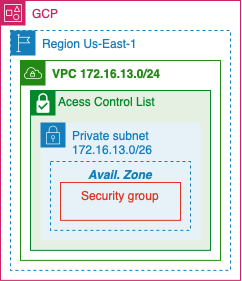
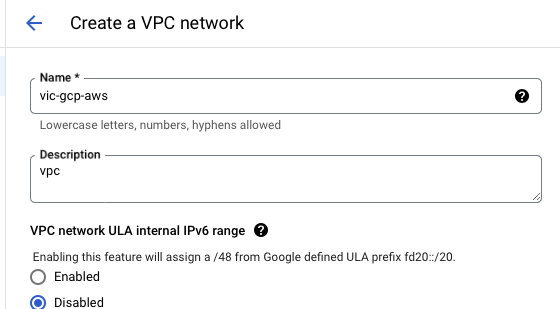
- Create a Virtual Private Cloud on Google
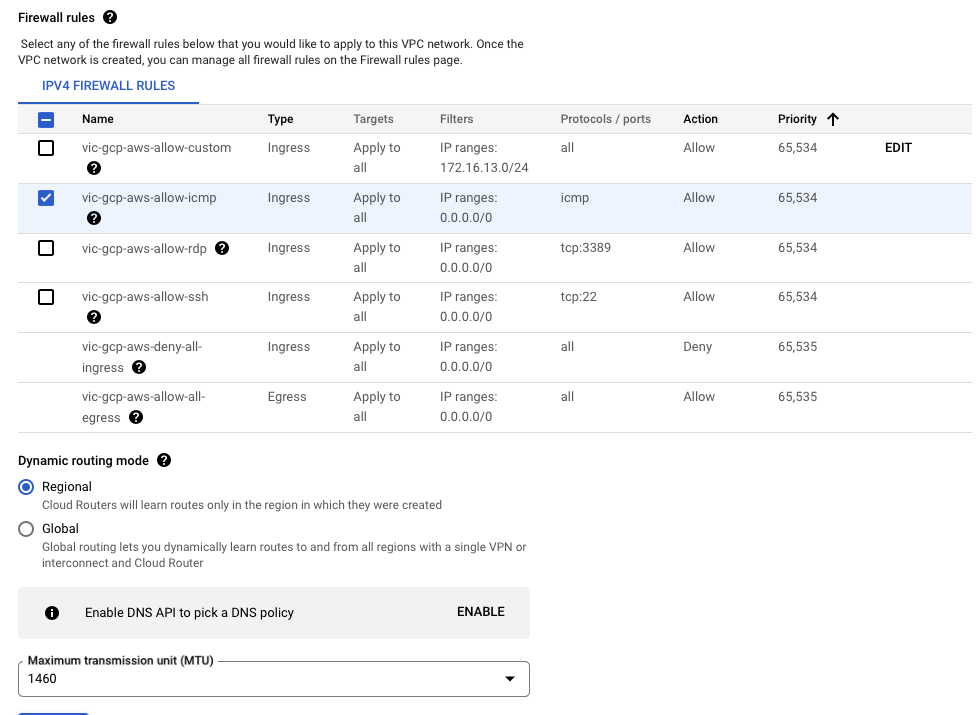
| Name | vpc-gcp-aws |
| Description | VPC |
| IPv6 | Disabled |
| Subnet | Custom |
| Subnet Name | Private |
| Subnet Region | us-east-1 |
| IP stack | IPv4 |
| IP range | 172.16.13.0/24 |
| Private Google Access | off |
| Flow Logs | off |
| IPv4 Firewall Rule | Ingress Apply to all 0.0.0.0/0 ICMP Allow |
| Dynamic Routing | Regional |
Network Connectivity Center
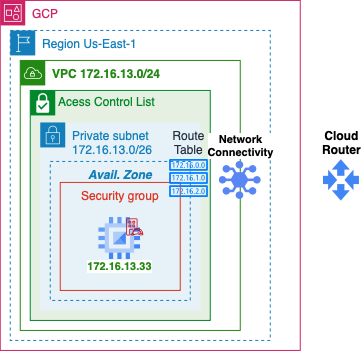
- TODO: GCP Network Connectivity
- Have a AWS site-to-site connection config to populate data
Cloud Router
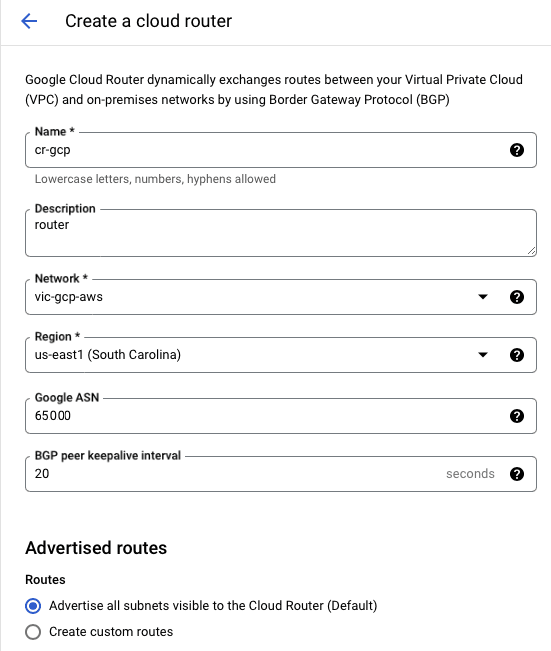
| Name | cr-gcp |
| Description | route |
| Network | vpc-gcp-aws |
| Region | us-east-1 |
| ASN | 65000 |
| Interval | 20 |
| Routes | Advertise all subnets to CR |
VPN Gateway
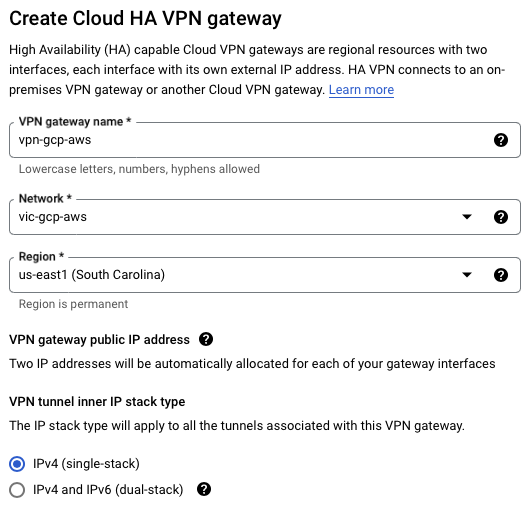
| Name | vpn-gcp-aws |
| Network | vpc-gcp-aws |
| Region | us-east-1 |
| IP stack | IPv4 |
Cloud DNS
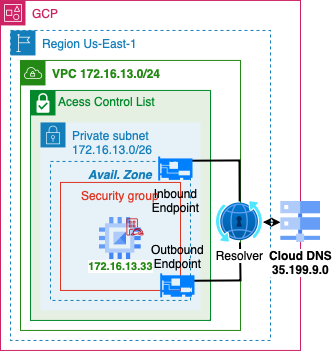
- TODO: GCP DNS
Peer VPN
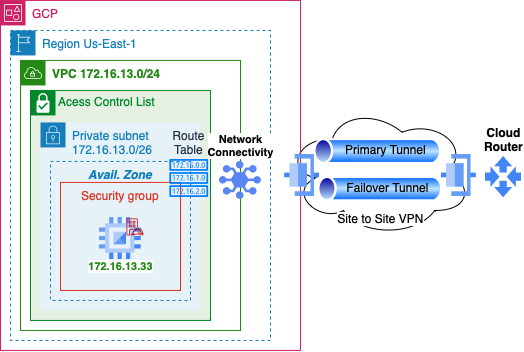
- Set up the infrastructure for GCP VPN
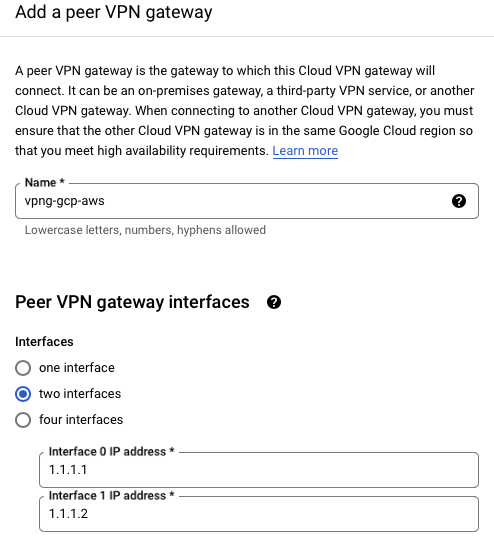
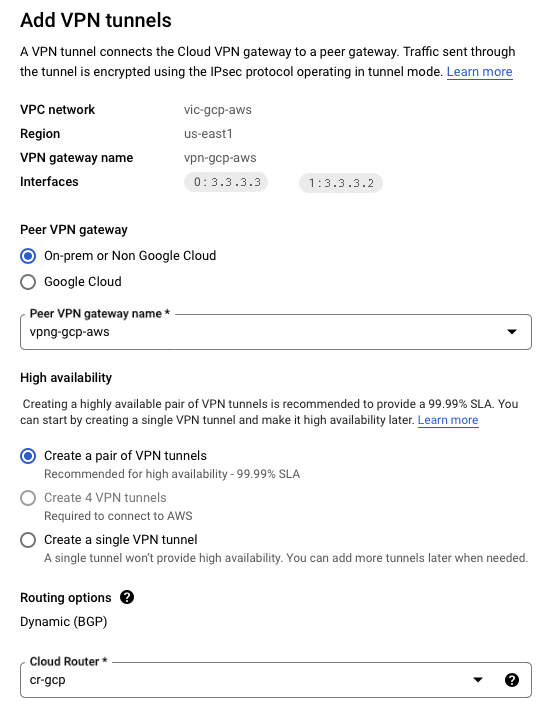

- Repeats these steps on interface 1 (failover)
| Name | vpng-gcp-aws |
| Interfaces | two interfaces |
| Interface 0 | 3.3.3.3 |
| Interface 1 | 3.3.3.2 |
| Peer VPN Gateway | On-Prem or Non Google |
| Peer VPNG Name | vpng-gcp-aws |
| High Availability | Create a pair of VPN tunnles |
| Cloud Router | cr-gcp |
| Associated Peer VPNG interface | 0: 1.1.1.1 |
| Name | conn1-gcp-aws |
| pre-shared key | strong password |
| Peer ASN | 64512 |
BGP
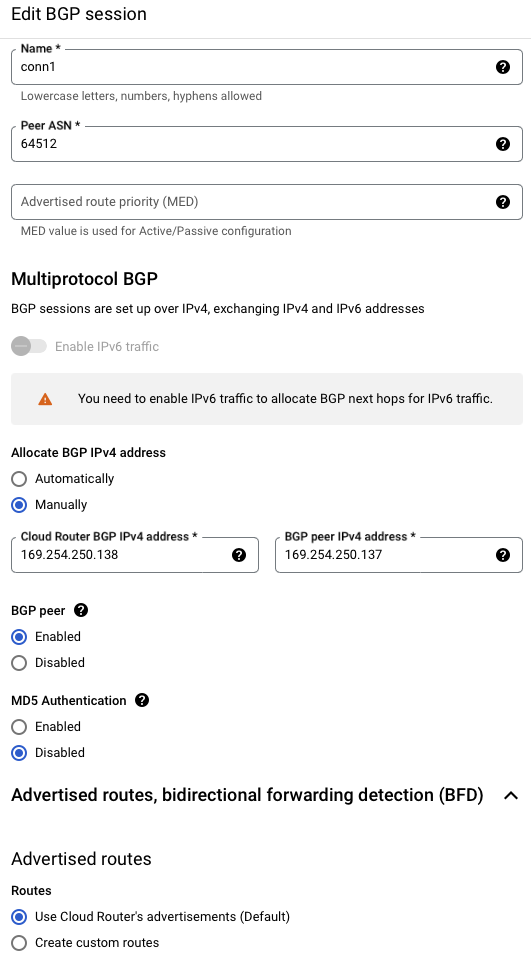
| Name | conn1 |
| Peer ASN | 64512 |
| BGB IPv4 address | Manually |
| Cloud Router BGP | 169.254.250.138 |
| BGP Peer Address | 169.254.250.137 |

- Verify Dynamic Route update
GCP vm

- GCP -> AWS
PFSense
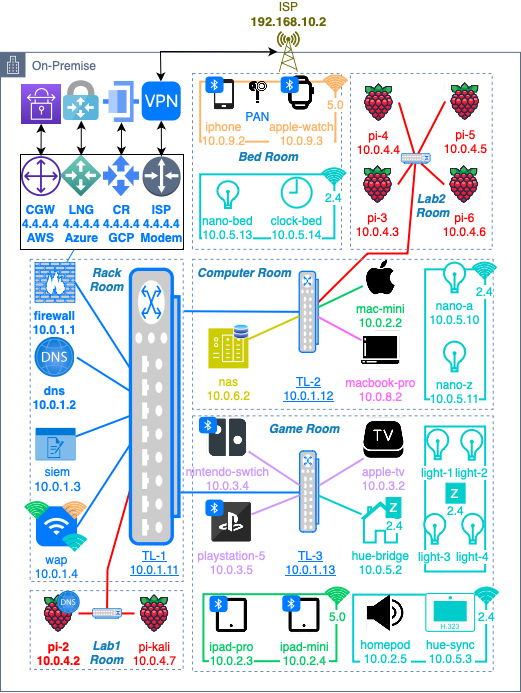
VLAN
Check out this write-up on how to configure VLANs with pfsense
ISP
TODO: Check out this write-up on how to configure a VPN Server with pfsense
PiHole
TODO: Check out this write-up on how to configure a DNS server with PiHole
IPSec
Phase 1
- Start by creating a primary tunnel and repeat the below steps for the failover connection tunnel 2
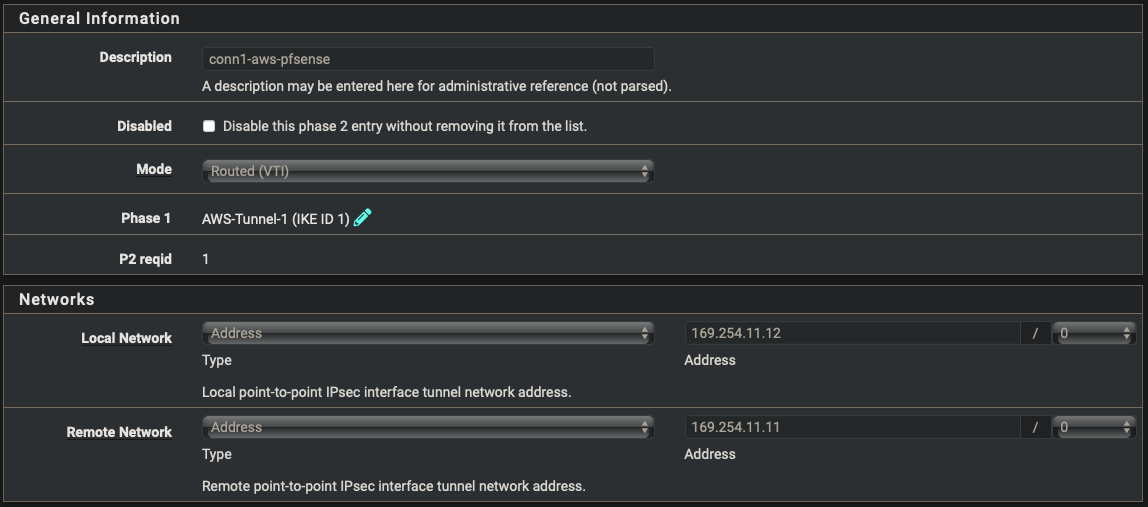
| Description | conn1-aws-pfsense |
| Key Exchange version | IKEv2 |
| Remote Gateway | 1.1.1.1 |
| Pre-Shared Key | strong password key token |
| Algorithm | AES |
| Key Length | 128 bits |
| Hash | SHA256 |
| DH Group | 14 (2048 bit) |
| Max failures | 3 |
Phase 2
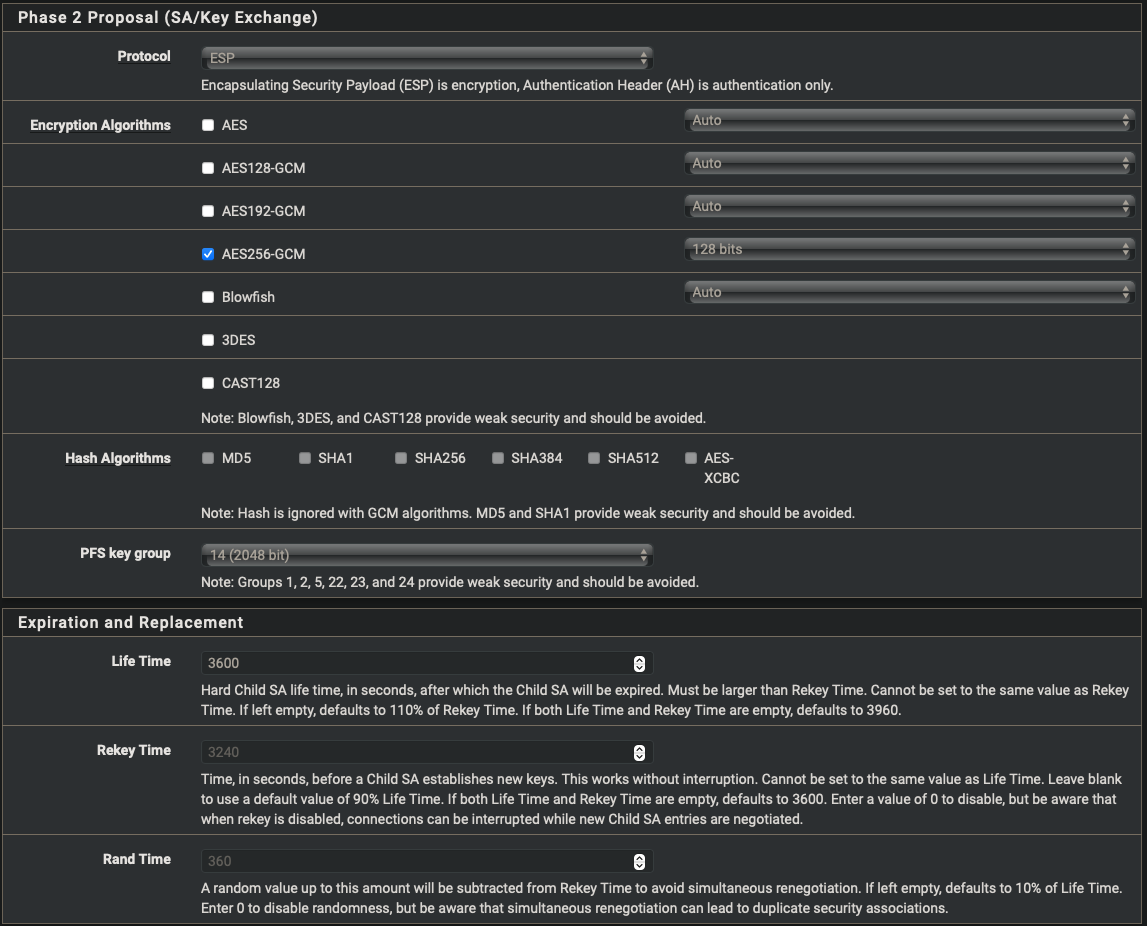
- Start by creating a primary tunnel and repeat the below steps for the failover connection tunnel 2

| Description | conn1-aws-pfsense |
| Mode | Routed (VTI) |
| Local Network | address: 169.254.11.12 |
| Remote Network | address: 169.254.11.11 |
| Encryption Algorithm | AES256-CGM 128bits |
| Ping Host | 172.16.11.11 |
| Keep Alive | Enabled |
Status
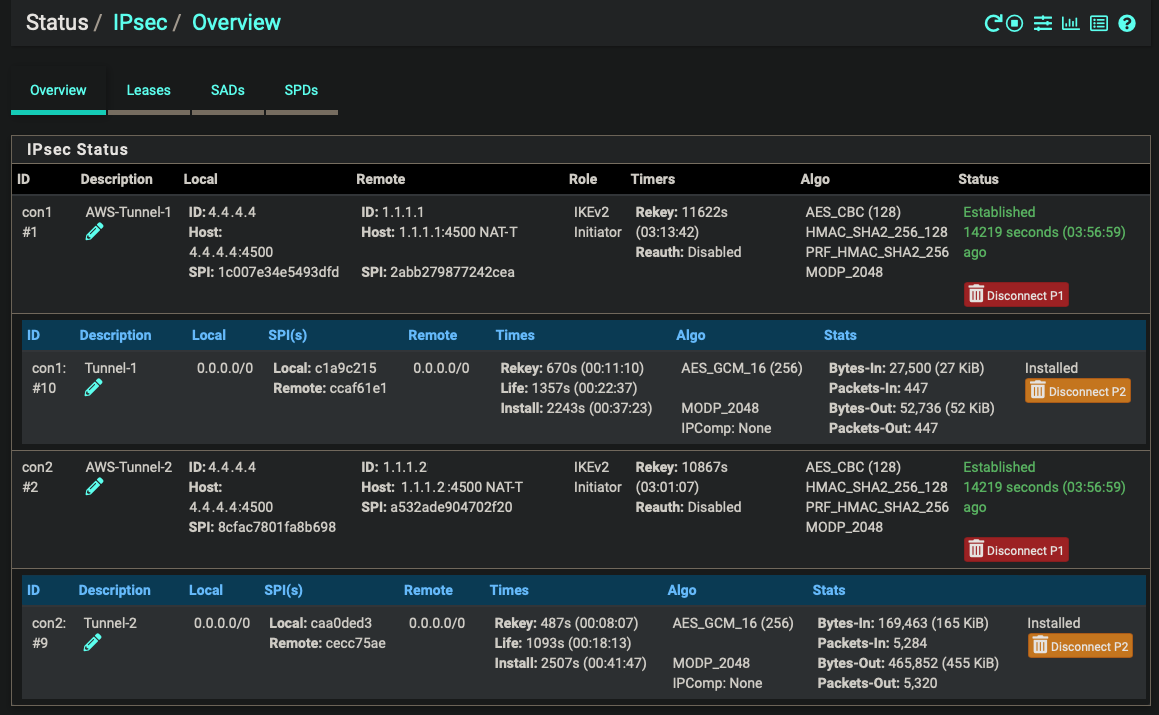
- Both primary and failover tunnels connected with IPSec
BGP
FRR Global Settings
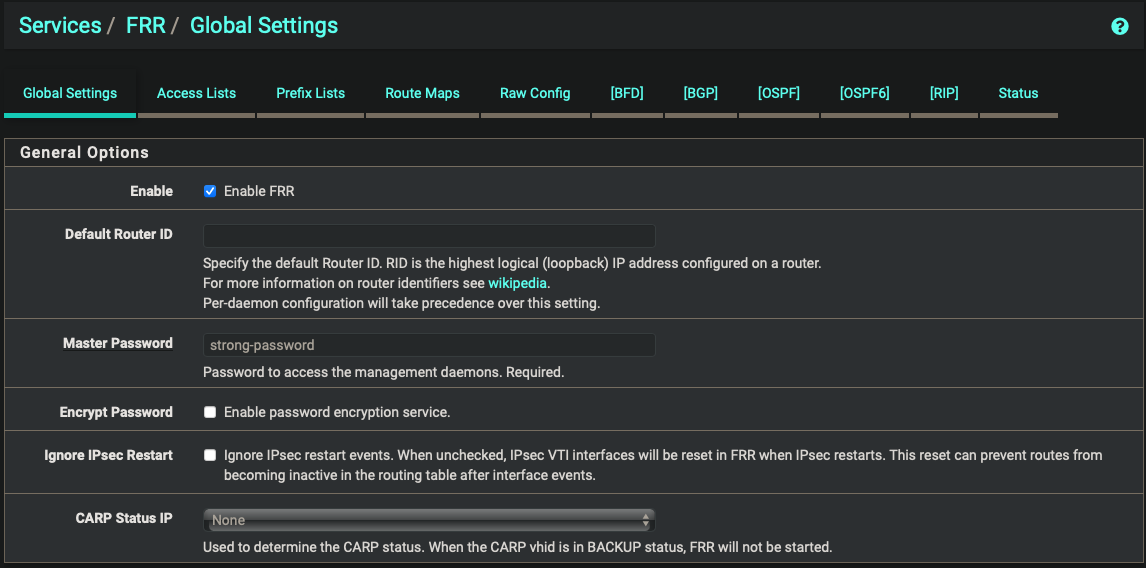
| Enabled | true |
| Master Password | strong password |
FRR Route Maps

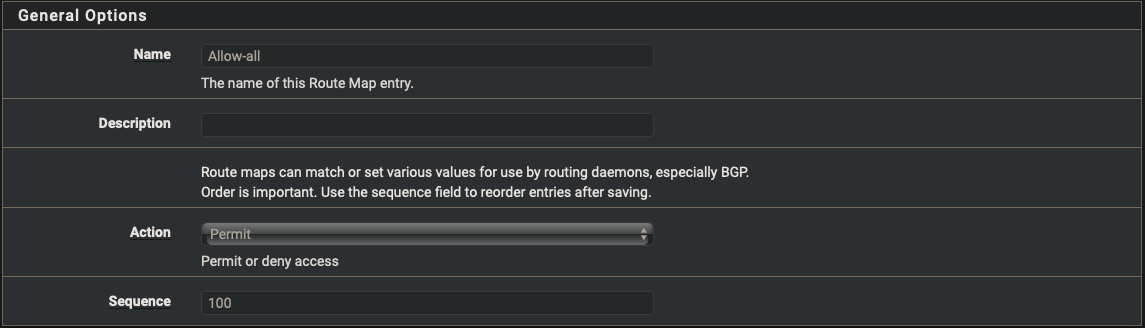
| Name | Allow-all |
| Action | Permit |
| Sequence | 100 |
FRR BGB

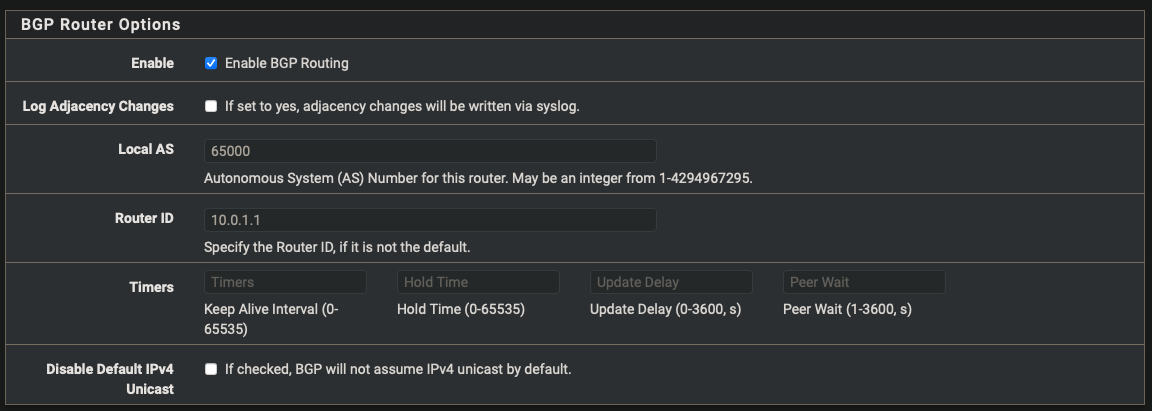
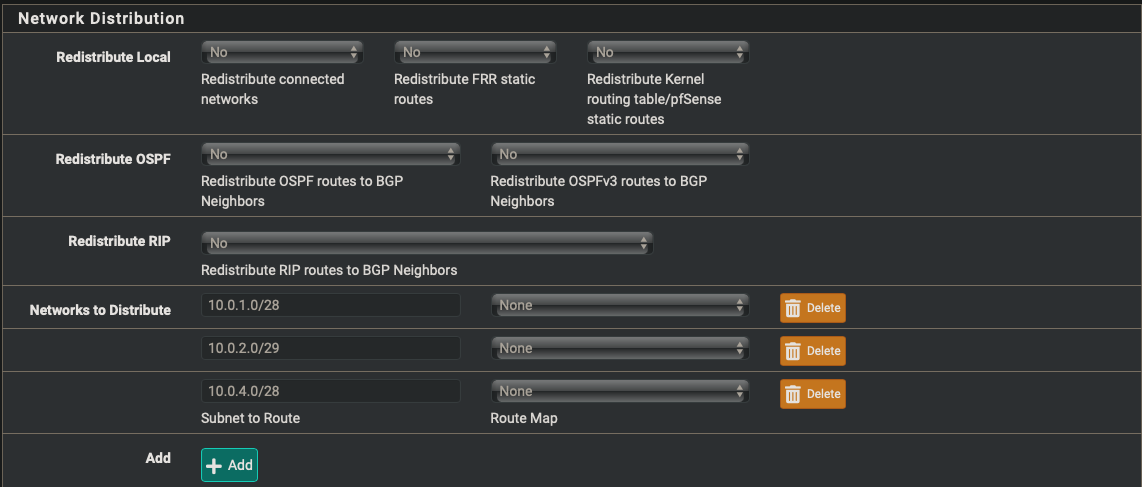
| Enabled | true |
| Local AS | 65000 |
| Router ID | 10.0.1.1 |
| Networks to distrbute | 10.0.1.0/28, 10.0.2.0/29, 10.0.4.0/28 |
FRR Neighbors

- Start with the primary tunnel and repeat the steps for the failover tunnel
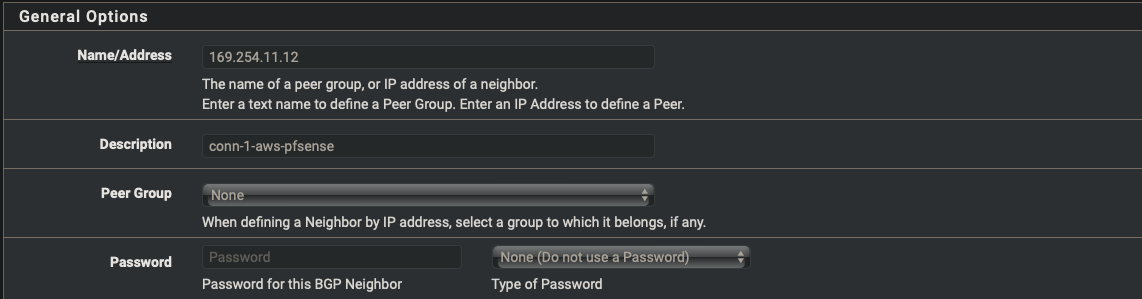
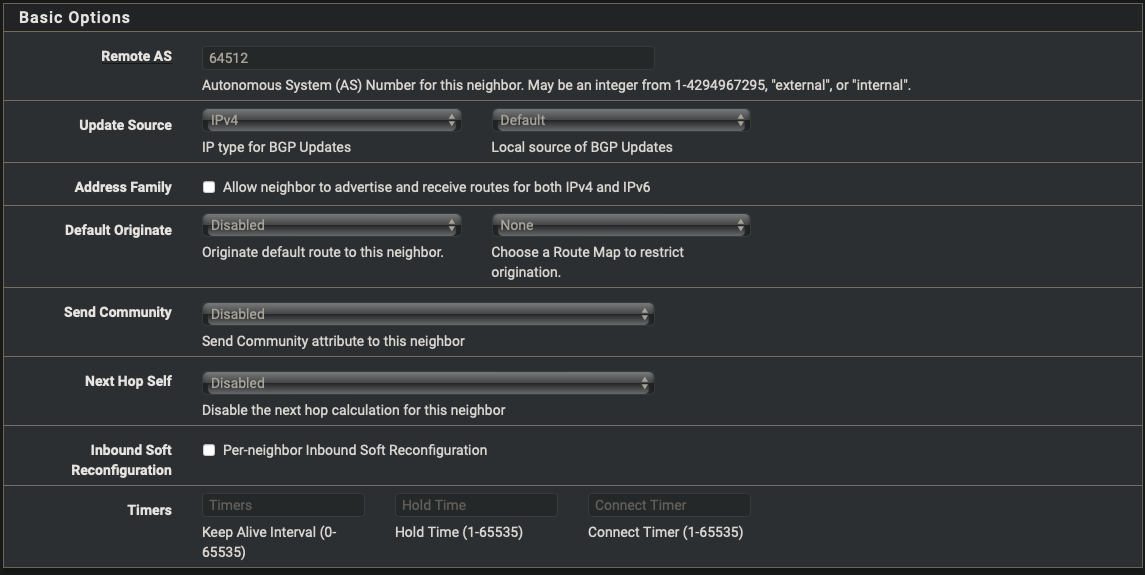
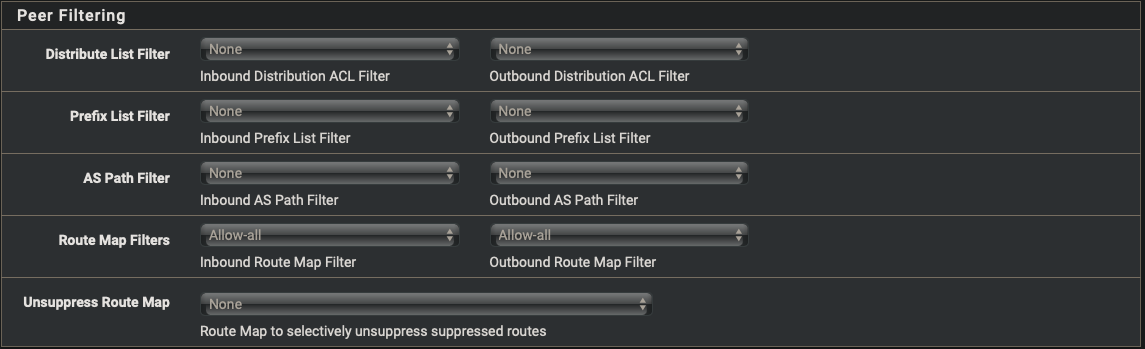
| Name/Address | 169.254.11.12 |
| Description | conn1-aws-pfsense |
| Remote AS | 64512 |
| Inbound Route Map Filters | Allow-all |
| Outbound Route Map Filters | Allow-all |
FRR Status
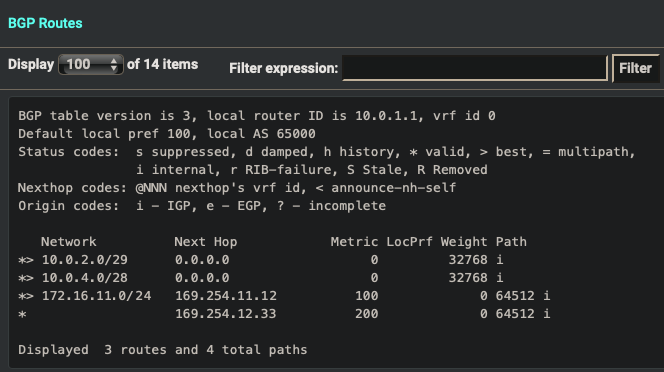
- Verify Dynamic Routes have been updated
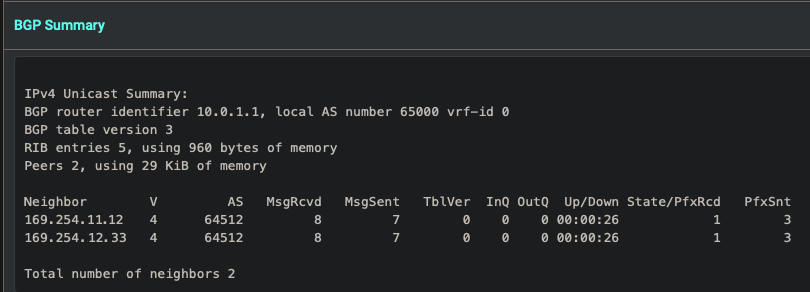
- View the BGP Summary
Mac

- Mac -> AWS